In our University we have multiple systems those running on Linux platforms so it is good to have local repository to prevent from downloading the remote repository over and over again. Also in university day time our downloading speed is low because of high network traffic so having a local repository is a big advantage to update our all systems once and its save our internet bandwidth because it use fast LAN connection.
Today I'm going to explain how to create local Centos repository to update our local Centos systems. So for that first we need to have rcync software and httpd server in Centos, default we can get these two in Centos otherwise you can use following command to install it.
su -c 'yum install httpd rsync'
Now we want to create directory to repo , that will hold all the RPM files. For that if we get all the Centos files from rsync we can create just one directory and rsync will automatically create folder structure according to it.
mkdir /var/www/html/CentOS/
If u copy Centos first from DVD or CDs you want to create Centos folder structure, because when rsync update your repository it used this folder structure to update for that.
su -c 'mkdir -p /var/www/html/centos/5/{os,updates}/x86_64'Here 5 is your Centos vertion and x86_64 is architecture, Then you can copy relevant files into /var/www/html/centos/5/os/x86_64/
 eg:su -c 'mount /dev/cdrom /mn
su -c 'cp -rv /mnt/CentOS /mnt/repodata /var/www/html/CentOS/5/os/x86_64/'
su -c 'umount /mnt'
Now you can verify it's working by opening your Centos folder using browser (in localhost or remote).
Eg:htp://your IP or 127.0.0.1/CentOS This how its look like in my server 
Now our repository server is ready since distributions change often we need to sync with the distribution update servers. So we use rsync for this job it scan directory tree of distribution servers and applies changes to local directory. So we need rsync mirror for updates.Centos OS Mirror List you can identify it with rsync.Now we need to create script to run this rsync when we need, following is the script that I used. (
./
Updating this repository should done often so running script manually is not good so we can use cron job to run this script automatically in relevant time. For that enter
updaterepo.sh)To run this script manually you can type#!/bin/bash s=1 for (( c=1; c<=3; c++ )) do if [ $s -ne 0 ]; then rsync -avSHP --delete --exclude "local*" --exclude "isos" ftp.jaist.ac.jp::pub/Linux/CentOS/5.5 /var/www/html/CentOS/ 2> error_log.txt s=$? fi done cp /usr/local/test /usr/local/suc
./
updaterepo Updating this repository should done often so running script manually is not good so we can use cron job to run this script automatically in relevant time. For that enter
crontab -e this will promt your current crontab table so you can enter your crontab here as follow. When you save this crontab file will loaded and ready for use.
0 2 * * * /myscripts/updaterepo In
this crontab, myscript is updaterepo.sh in /myscripts directory I'm going to run this script every morning at 2am. There are five fields for setting the date and time in cron tab that a program should be run. The five time settings are in the following order. - Minutes - in therange of 0 - 59
- Hour - in the range of 0 - 23
- Day of month - in the range 1 - 31
- Month - in the range 1 -12
- Day of week - in the range 0 - 6 (0 = Sunday)
Any field with a * means run every possible match, so for example a * in the day of month field will run the script every single day of the month at the specified time. More about crontab
That was all on the server part. Now client should chang his /etc/yum.repos.d/CentOS-Base.repo to get local mirror instance of other mirrors. for that you should change base url with your local ip. Its good to copy following my file and replace my IP with your one.
Now you are done
That was all on the server part. Now client should chang his /etc/yum.repos.d/CentOS-Base.repo to get local mirror instance of other mirrors. for that you should change base url with your local ip. Its good to copy following my file and replace my IP with your one.
#replace your repo IP with my 10.16.91.1

[base]
name=CentOS-$releasever - Base
#mirrorlist=http://mirrorlist.centos.org/?release=$releasever&arch=$basearch&repo=os
baseurl=http://10.16.91.1/CentOS/$releasever/os/$basearch/
gpgcheck=1
gpgkey=file:///etc/pki/rpm-gpg/RPM-GPG-KEY-CentOS-5

#released updates
[updates]
name=CentOS-$releasever - Updates
#mirrorlist=http://mirrorlist.centos.org/?release=$releasever&arch=$basearch&repo=updates
baseurl=http://10.16.91.1/CentOS/$releasever/updates/$basearch/

gpgcheck=1
gpgkey=file:///etc/pki/rpm-gpg/RPM-GPG-KEY-CentOS-5

#packages used/produced in the build but not released
[addons]
name=CentOS-$releasever - Addons
#mirrorlist=http://mirrorlist.centos.org/?release=$releasever&arch=$basearch&repo=addons
baseurl=http://10.16.91.1/CentOS/$releasever/addons/$basearch/

gpgcheck=1
gpgkey=file:///etc/pki/rpm-gpg/RPM-GPG-KEY-CentOS-5

#additional packages that may be useful
[extras]
name=CentOS-$releasever - Extras
#mirrorlist=http://mirrorlist.centos.org/?release=$releasever&arch=$basearch&repo=extras
baseurl=http://10.16.91.1/CentOS/$releasever/extras/$basearch/

gpgcheck=1
gpgkey=file:///etc/pki/rpm-gpg/RPM-GPG-KEY-CentOS-5

#additional packages that extend functionality of existing packages
[centosplus]
name=CentOS-$releasever - Plus
#mirrorlist=http://mirrorlist.centos.org/?release=$releasever&arch=$basearch&repo=centosplus
baseurl=http://10.16.91.1/CentOS/$releasever/centosplus/$basearch/

gpgcheck=1
enabled=0
gpgkey=file:///etc/pki/rpm-gpg/RPM-GPG-KEY-CentOS-5

#contrib - packages by Centos Users
[contrib]
name=CentOS-$releasever - Contrib
#mirrorlist=http://mirrorlist.centos.org/?release=$releasever&arch=$basearch&repo=contrib
baseurl=http://10.16.91.1/CentOS/$releasever/contrib/$basearch/

gpgcheck=1
enabled=0
gpgkey=file:///etc/pki/rpm-gpg/RPM-GPG-KEY-CentOS-5
Now you are done


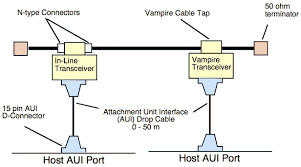


 In this post I'm going to talk about important concepts of networking that really help you to do CCNA with great knowledge.also in this section I'm describing extra things that not in CCNA syllabus but these basic concepts are help you to get clear idea about networking.
 Let's get some brief idea about some important devices in network
 Router used to forward data among computer networks beyond directly connect devices so routers route packets of abstracts from one arrangement to another.Routers are most commonly related to Network layer of the OSI model (layer 3 ), but arguably also operate on Data Link (layers 2)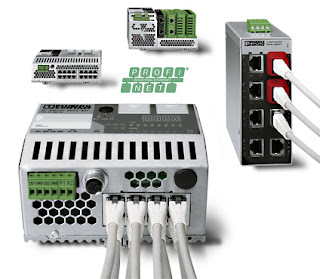


 A network interface card is used to connect a computer to an Ethernet network. The card provides an interface to the media.The card usually also contains the protocol control firmware and Ethernet Controller needed to support the Medium Access Control (MAC) data link protocol used by Ethernet. NIC work at Physical(Layer 1) and Data link(Layer 2) Layers of OSI model.


